


Introduction
Qwen3.8-Flash-Next is a model that delivers response quality good enough that I’d almost call it a next-generation model that has already reached a certain level of completion. Because of that, quite a few people want to get their hands on it — popular enough that some people have gone out of their way to buy up multiple used NVIDIA Tesla V100 32GB cards just to run it.[1]
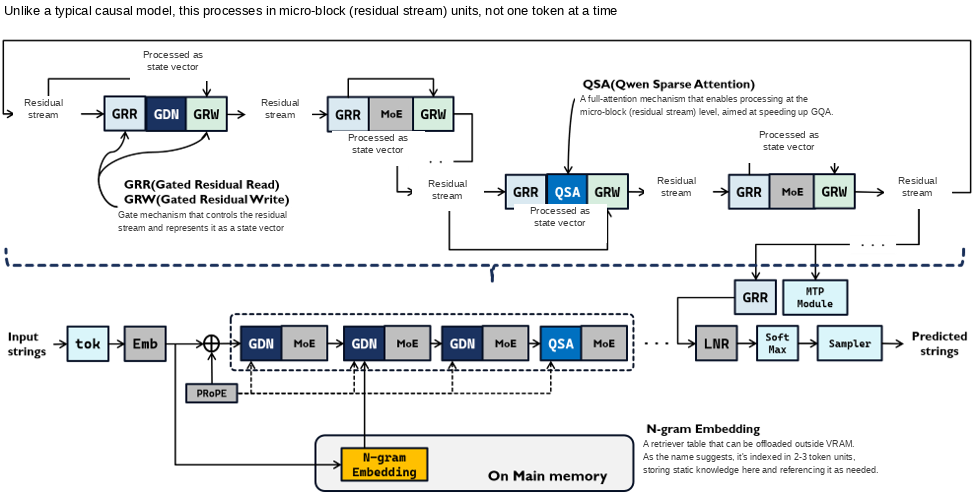 Figure 1: Architecture diagram of Qwen3.8-Flash-Next
This model’s parameter count comes out to 125B + 51B (n-gram) + 4B (MTP) – A6B — a fairly large model. (Of that, the 51B n-gram portion, roughly 27GB, runs out of main memory.) When I evaluated it myself, my own environment couldn’t handle it at all, so I borrowed a machine with an NVIDIA A100 from Highreso to run the evaluation. Then, right around early October, I heard that this model could be run with far fewer resources, and still run fast.
My first reaction was, “No way that’s real — it’s probably just some trick that fakes a speed boost,” but…
What I’m introducing this time is Strata, an inference engine that actually pulls this off.
How to read this article This article walks through how Strata works and shares measured results covering KV/Expert cache behavior. If you’d like to read it in order, just keep going. If you just want the numbers, feel free to skip ahead to “What’s It Actually Like to Use?”
About Strata
Strata is an inference engine built on top of llama.cpp, packed with various tricks that let it run quantized versions of Qwen3.8-Flash-Next in low-resource environments. It can expose basically the same interface as llama.cpp, and it runs models from GGUF files. As a minimum setup, it needs:
At least 48GB of free main memory
At least 12GB of free VRAM
At least 100GB of SSD space
— and with that, remarkably, it can run Qwen3.8-Flash-Next.
It’s created by Niko Veit (https://x.com/coldniko), built together with a group of volunteers. As of this writing, the latest version is v0.2.2.[2]
Let me walk through each of the ideas built into it.
The 3-Tier Resource Structure
Rather than placing everything on the GPU, Strata lays resources out across a 3-tier structure, built to take good advantage of Qwen3.8-Flash-Next’s MoE architecture and its n-gram Embedding.
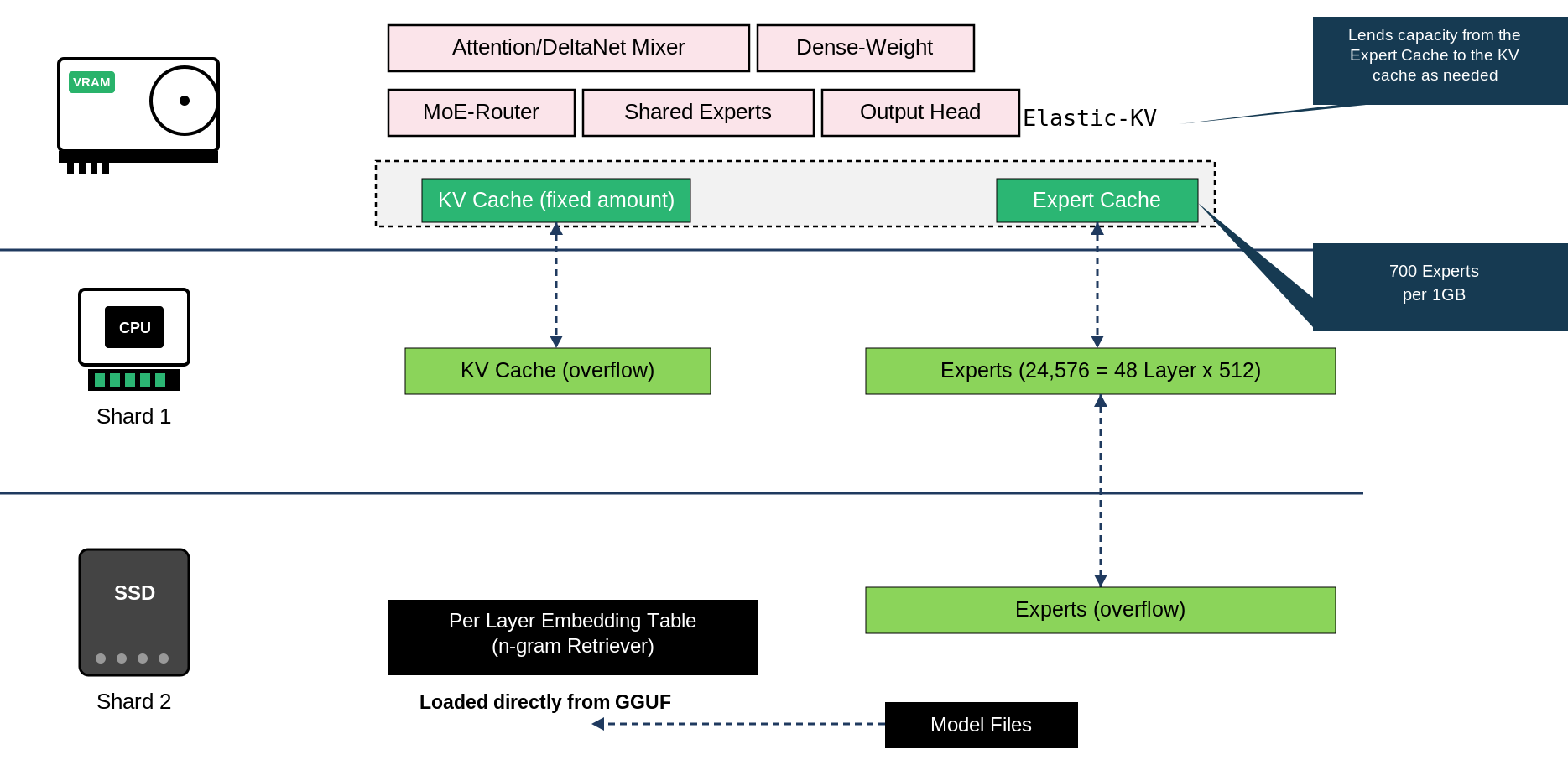 Figure 2: The 3-tier resource hierarchy
Only the parts that are absolutely required stay fixed on the GPU, while all non-shared Experts are placed in main memory. Frequently used Experts are then pulled into an “Expert Cache” as needed, so that only the highest-frequency Experts occupy the fast tier.
The KV Cache is likewise split across two tiers.
To squeeze out context length more efficiently, Strata adopted the Elastic KV approach (--kv-grow) starting in v0.1.40. Previously, the KV cache was a fixed size, overflowing into pinned host memory as a fallback when needed. With Elastic KV, the mechanism changed so that memory can be handed over from the cold Expert Cache to the KV cache first, when needed — allowing it to keep responding quickly even when longer context sizes are requested.
The n-gram Retriever, which Qwen3.8-Flash-Next originally keeps in main memory, gets shifted onto the SSD instead. In a sense, this is closer to the original intended use of PLE, and since that data is read directly from the GGUF file, it’s designed to avoid adding SSD overhead — a genuinely helpful touch in a resource-constrained environment.
Not Just a llama.cpp Wrapper
The engine that Strata runs on is built on top of ggml-org/llama.cpp, but it’s really a hybrid engine — a derivative engine with its own extensions — that adds substantial custom implementation on top for things like MoE offloading, speculative decoding, and custom kernels.
Automatic Tuning
At the end of the install process, Strata runs automatic tuning and sets reasonably optimal parameters for your environment. That means you can get solid performance without fine-tuning parameters by hand after installation, cutting down the time it takes to go from setup to production.
MTP Is On by Default
As a way to boost generation speed, the MTP (speculative token prediction) feature is on by default. This allows very fast token generation, especially in multi-turn scenarios, letting you fit more inference work into a limited amount of time.
The Load on the SSD Is Almost Entirely Read Load
Since Strata also uses the SSD, I was initially worried that something like an SSD cache might wear down the NAND through heavy rewriting. In practice, though, most of what occupies that space is n-gram Embedding. The data making up the n-gram Embedding is static knowledge data, so it never gets rewritten — it simply gets read as needed.
So the risk of the SSD degrading rapidly and becoming unusable because of Strata is expected to be extremely low.
A GPU Profile That Fits the Bill Perfectly
For this evaluation I used an easy-to-rent, NVIDIA RTX A4000-equipped GPU cloud instance.
It’s a container-based instance I’ve used often for evaluating things in an isolated environment, and for testing models an RTX 3060 can’t handle, before I eventually bought my own Intel ARC Pro B70.
| Item | Specification |
|---|---|
| GPU | NVIDIA RTX A4000 |
| GPU memory | GDDR6 16GiB |
| GPU memory bandwidth | 448.0 GB/s |
| FP32 compute | 19.17 TFLOPS |
| BF16 compute | 38.34 TFLOPS |
| INT8 compute | 153.4 TOPS |
| INT4 compute | 306.7 TOPS |
| vCPU | 11 Core |
| System memory | 62.5 GiB [3] |
| Storage | Persistent 100 GiB |
| CUDA version | 13.2 |
| NVIDIA Driver Ver. | 580 |
| OS | Ubuntu 24.04 Server |
Table 1: Specs of the NVIDIA RTX A4000 GPU instance used in this testing
Right as I was about to evaluate Strata, I looked at this machine’s specs and noticed they lined up almost perfectly with what Strata needs. So I decided to see whether I could turn this RTX A4000 instance into a proper appliance for running Qwen3.8-Flash-Next.
Running Strata
Starting Strata
To start Strata, run the launch command with the path you specified during installation. The first run went through the install process, but once a configuration already exists, startup proceeds according to that configuration.
$ /home/user/.local/bin/strata launchThe screen below appears; select the model name shown at the top and press Enter to start the engine.  (Screen 1)
Note that the engine takes roughly 480 seconds to start up. During that time it’s loading and placing various things from disk into memory, so it’s worth being aware that this puts a fair amount of load on disk I/O.
Stopping Strata
To stop Strata, press Ctrl+C to terminate the process. Doing so brings up a screen like the one below.
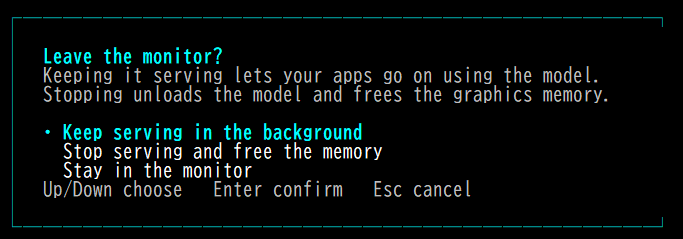 (Screen 1)
Selecting Stop serving in the background stops it.
You can also just detach from the foreground and keep the engine running in the background — in that case, select Keep serving in the background.
Updating Strata
Strata has an update command that lets you update to the latest version. Below is an example run — you can see the engine and the control plane each getting updated.
$ strata update
Strata update (https://github.com/Niko1221/Strata/releases/latest/download)
Reading the signed update feed
downloading engine 0.1.48 linux-x86_64-cuda-cuda13: 100% (578 of 578 MiB)
Unpacking 0.1.48 linux-x86_64-cuda-cuda13
Checking the package signature and every file
Test-starting engine 0.1.48 linux-x86_64-cuda-cuda13 before switching to it
Switching to engine 0.1.48 linux-x86_64-cuda-cuda13
Engine 0.1.48 is installed and will be used on the next start
downloading Control 0.1.49.1: 100% (94 of 94 MiB)
Unpacking Control 0.1.49.1
Test-starting Control 0.1.49.1
Feed sequence 111, signed by 5d1bc23abbeffd0d
Engine 0.1.47 -> 0.1.48 updated (tested: started, answered one token, stopped)
Control 0.1.47 -> 0.1.49.1 updated. The next `strata` command already runs it; the app switches on its next start
Saved tuning presets: marked for the short re-check (nothing was deleted).
The previous engine version is kept; `strata components rollback` returns to it.
It looks like a functional test runs whenever the engine gets swapped out, so updates tend to take a while.
Configuring Strata
This is one of Strata’s weak points: there’s no proper reference documentation for its configuration. Also, the spec seems to differ slightly between the v0.1.x and v0.2.x series.
The configuration file lives at the following location.
/home/user/.config/strata/launch-presets/iq3_xxs-128k.jsonIn my case, the configuration file looked like this.
{
"access": "lan",
"api_key": "XXXXXXXXXXXXXXXXXXXXXXX",
"context": 131072,
"created": "2026-10-23 13:54:09.666900",
"data_dir": null,
"extra": {
"STRATA_PIN_BY_NEED": "on"
},
"family": "qwen",
"gpu_roles": null,
"gpus": null,
"kv": null,
"last_used": "2026-10-23 15:28:25.785562",
"model": "IQ3_XXS",
"model_path": null,
"mtp": null,
"name": "IQ3_XXS 128K",
"no_key": true,
"parallel": null,
"port": 8080,
"schema": "strata.launch/1",
"tune": "quick",
"tune_allow_small": false,
"tuned_at": "2026-10-23",
"tuned_preset": "4082656e867d420899b7348cd4987f74",
"vision": "cpu"
}
As for what each of these settings changes, here’s a table covering the fields that are actually present.
| Key | Your value | Meaning |
|---|---|---|
| schema | strata.launch/1 | Version identifier for the preset format — the SCHEMA constant itself |
| name | IQ3_XXS 128K | Preset name. The filename iq3_xxs-128k.json is a slugified form of this name (lowercased, symbols replaced with -) |
| family | qwen | The catalog “family” (qwen / swift / coder / unsloth / gyro / nvfp4 …). qwen is the original Qwen3.8-Flash-Next quantization |
| model | IQ3_XXS | The catalog size (quantization strength). The recommended tier for the 48GB generation |
| model_path | null | The “use your own .gguf / folder” path is not used |
| data_dir | null | Model storage location is Strata’s default folder |
| gpus | null | GPU selection is left to the engine (uses all available cards) |
| gpu_roles | null | Per-card roles (main / helper / off) follow the recommendation. Only meaningful with multiple cards |
| context | 131072 | 128K tokens. parse_context normalizes 128k / 131072 alike to the same value. Default options range from 8K to 512K |
| kv | null | K/V cache quantization. Follows the same default as setup: “use int8 above 8K” (choices: int8 / q4_0 / k8v4 / fp16) |
| vision | cpu | Run the image reader on CPU. Choices: off / on / gpu / cpu |
| parallel | null | Number of simultaneous requests. Default is “match the card” (VRAM 12GB→1, 20→2, 24→3, 32GB+→4). Valid range 1–8 |
| mtp | null | Draft layer kept “as installed” (on) |
| tune | quick | Auto-tuning method. quick (~20 min) / thorough (up to 2 hours) / skip |
| tune_allow_small | false | Checkbox for “accept that answers may change slightly.” Default off. Only when true does --allow-small-differences get added to the launch command |
| access | lan | Exposure scope: local / lan / cloudflare / tailscale. lan means “my own local network” |
| port | 8080 | Server port (default value). OpenAI-compatible endpoint is http://<IP>:8080/v1 |
| api_key | (configured) | Secret key. “Never shown in full; stored only in the private preset file” |
| no_key | true | The --no-api-key flag for “intentionally exposing without a key to other machines.” Produces a warning, not a refusal |
| extra | {“STRATA_PIN_BY_NEED”: “on”} | Advanced settings — a bag for engine-side flags / STRATA_* environment variables set via --set key=value |
| tuned_preset | (omitted) | ID of the tuning preset saved by the tuner (also visible from the app via strata presets) |
| tuned_at | 2026-10-23 | Date tuning was performed. If either tuned_preset or tuned_at is present, it’s considered “already tuned” and won’t be re-measured going forward |
| created / last_used | 2026-10-23 | Creation time / last-used time (runtime info updated on every launch) |
Table 3: Configuration fields and their details
Other launch-time arguments are covered in the appendix at the end of this article.
How Strata Works Internally
Running the strata command appears to kick off the surrounding processes in roughly the following flow.
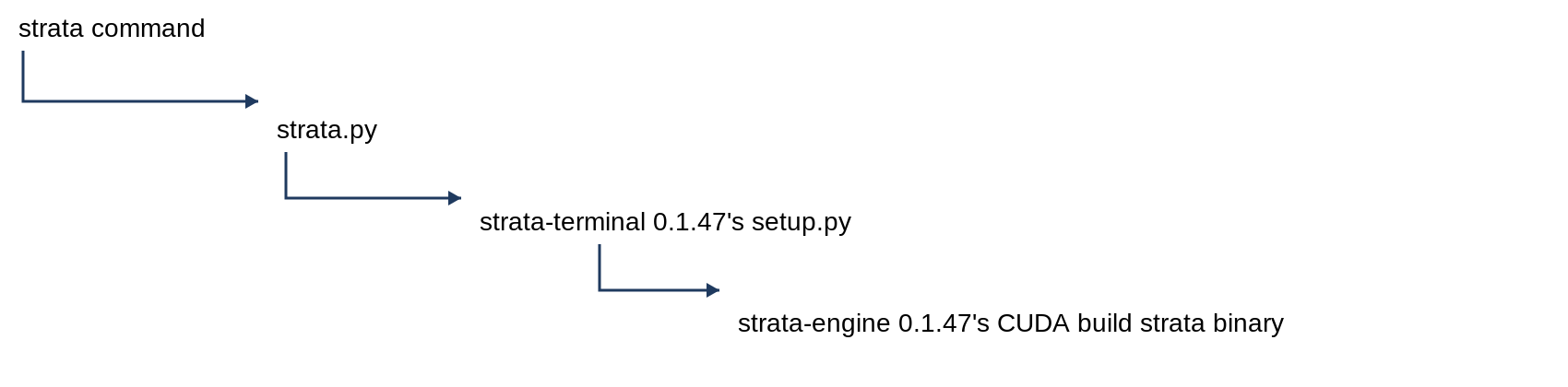 Figure 4: The chain of components the strata command sets in motion
The strata command acts as a wrapper around ~/.local/share/strata/terminal/0.1.47/strata.py, which runs through a Python 3.12 build prepared specifically for Strata. strata.py then runs ~/.local/share/strata/terminal/0.1.47/setup.py, the launch command for the strata-terminal subcomponent.
As it happens, this same setup.py was originally the strata-engine launch command back in the v0.1.x series. The strata command introduced in v0.2.x is, in essence, a version with expanded management commands layered on top.
From there, setup.py launches a subcomponent called strata-engine, tailored to the environment, which runs as the actual engine itself. Tracing how the command changes at each step makes it easy to see exactly what configuration it ends up launching with.
Example: the input command
strata launch
--preset IQ3_XXS 128K
--no-tui
What gets launched first
/home/user/.local/share/strata/terminal/0.1.47/python/bin/python3.12 /home/user/.local/share/strata/terminal/0.1.47/strata.py launch
--preset IQ3_XXS 128K
--no-tui
What gets launched next
/home/user/.local/share/strata/terminal/0.1.47/python/bin/python3.12 /home/user/.local/share/strata/terminal/0.1.47/setup.py
--yes
--no-start
--family qwen
--model IQ3_XXS
--context 262144
--vision cpu
--experimental-speed-projection off
--data-dir /home/user/Strata-data
What gets launched last
/home/user/.local/share/strata/components/engine/0.1.47-linux-x86_64-cuda-cuda13/strata
--serve
--pack /home/user/Strata-data/packs/iq3_xxs
--native /home/user/Strata-data/models/IQ3_XXS/Qwen3.8-Flash-Next-GSQ-RCO-IQ3_XXS-00001-of-00002.gguf
--ple-gguf /home/user/Strata-data/models/IQ3_XXS/Qwen3.8-Flash-Next-GSQ-RCO-IQ3_XXS-00002-of-00002.gguf
--expert-profile /home/user/.local/share/strata/terminal/0.1.47/data/expert-profile.bin
--expert-cache auto --prefill auto
--spec 4
--spec-min-p 0.5
--mtp /home/user/Strata-data/mtp/rt
--max-context 262144
--kv int8
--vision
The Structure of the Strata-data Directory
You probably noticed on screen that a Strata-data directory gets created during installation. What’s actually stored in there? Here’s what it looks like.
It holds everything related to the model — the model itself, the tokenizer, and so on. A profile gets created based on the model name chosen at install time, and everything is stored according to that profile.
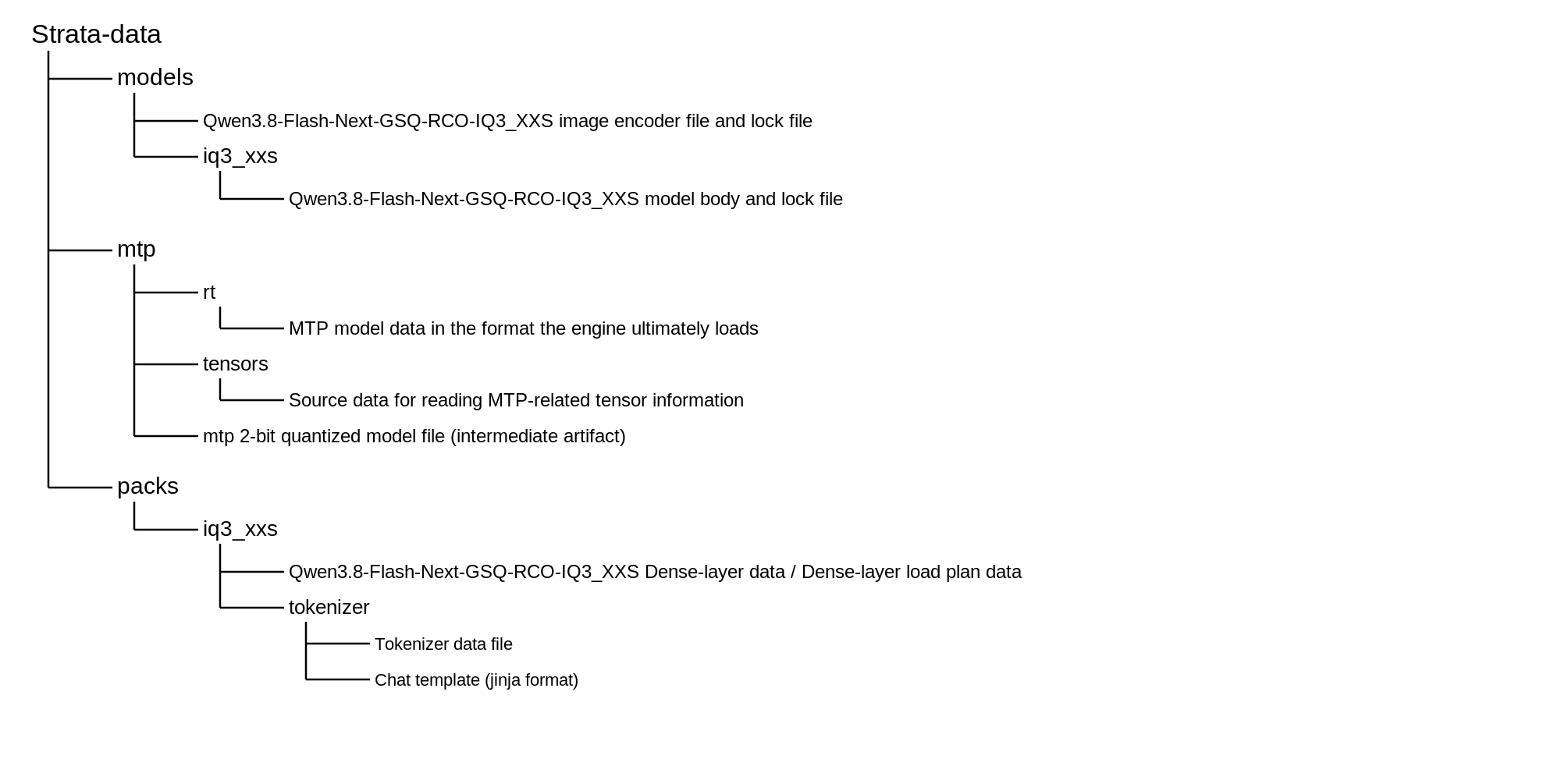 Figure 5: Layout of the Strata-data directory
Strata doesn’t simply reconstitute the model straight from the GGUF file — the data actually goes through the process shown below before it’s stored.
| Data category | How it’s read | Notes |
|---|---|---|
| Dense layer data | Converted into a proprietary format and placed on disk beforehand, then read by the engine | Stored as data such as dense.bin |
| Expert layer data | Read directly from GGUF; in principle all Experts are first loaded into main memory, then moved to VRAM based on a separately-determined Expert placement plan | Since it’s read from GGUF, no separate file is placed |
| N-gram Embedding data | Read from GGUF on demand, as needed | Since it’s read from GGUF, no separate file is placed |
Table 4: How data is read in, depending on category
Strata’s Web Frontend
llama.cpp comes with a web frontend, where hitting the URL directly shows a chat screen — and Strata has something similar built in too.
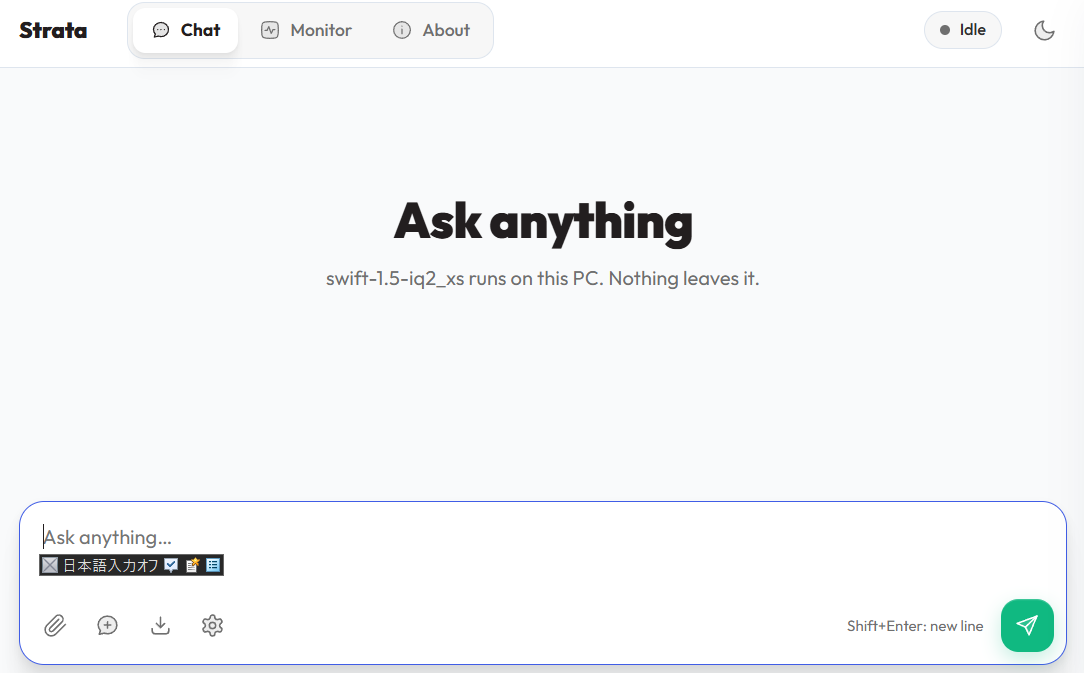 Figure 6: Strata’s web frontend
What really stands out is the monitoring screen, which you get to by clicking “Monitor” in the upper left of the screen.
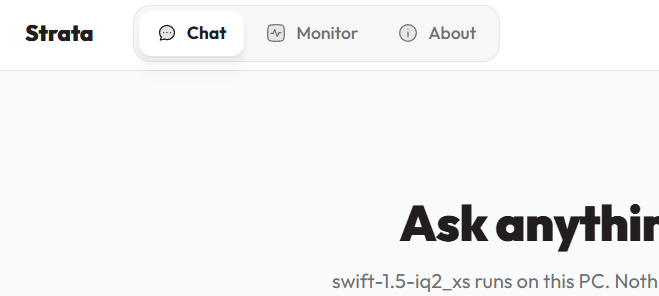 Figure 7: The menu-switching area
This screen shows real-time status, and the “Model State” view in particular lets you see exactly what the model currently loaded on Strata is doing at any given moment.
You can even track whether the GPU or the CPU is doing the processing, down to hybrid states between the two.
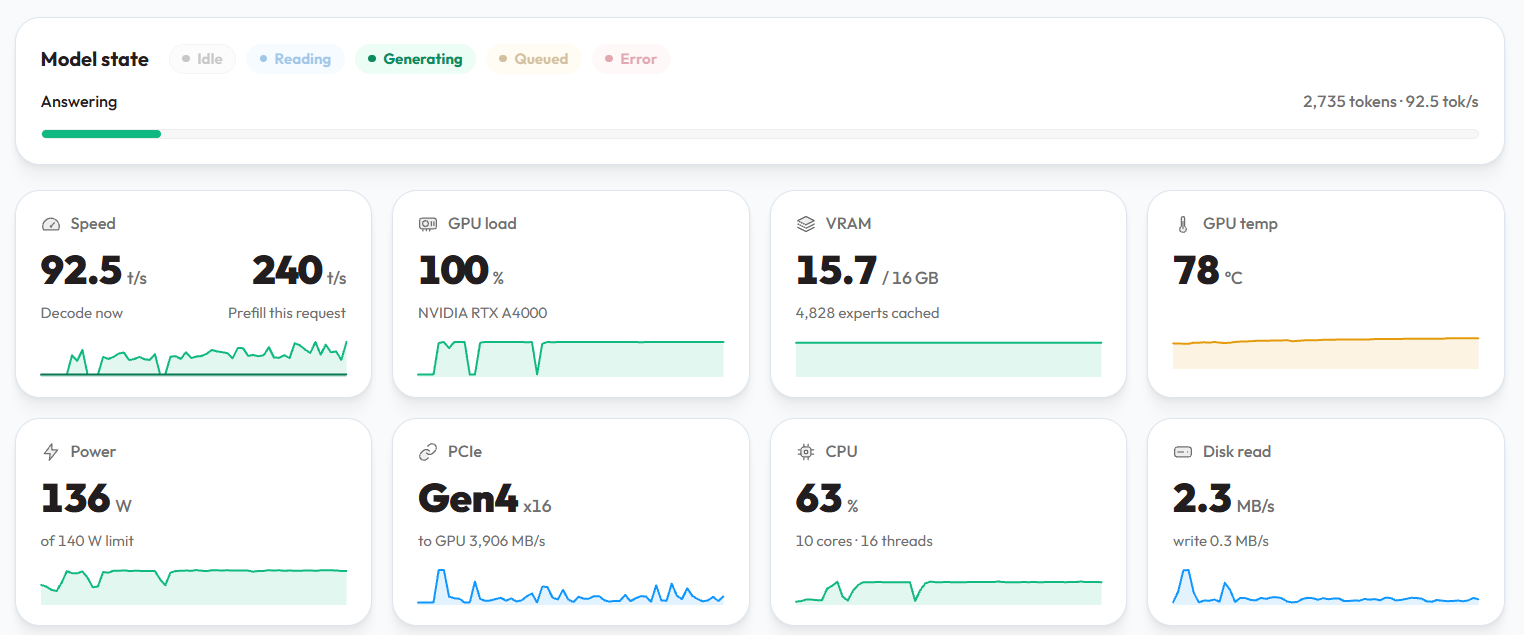 Figure 8: The top half of the monitoring screen shows a range of real-time statuses
The bottom half of the monitor screen is laid out to show how much of the context is in use and how many Experts are resident in VRAM. On the right side, you’ll find a record of the inference work carried out so far.
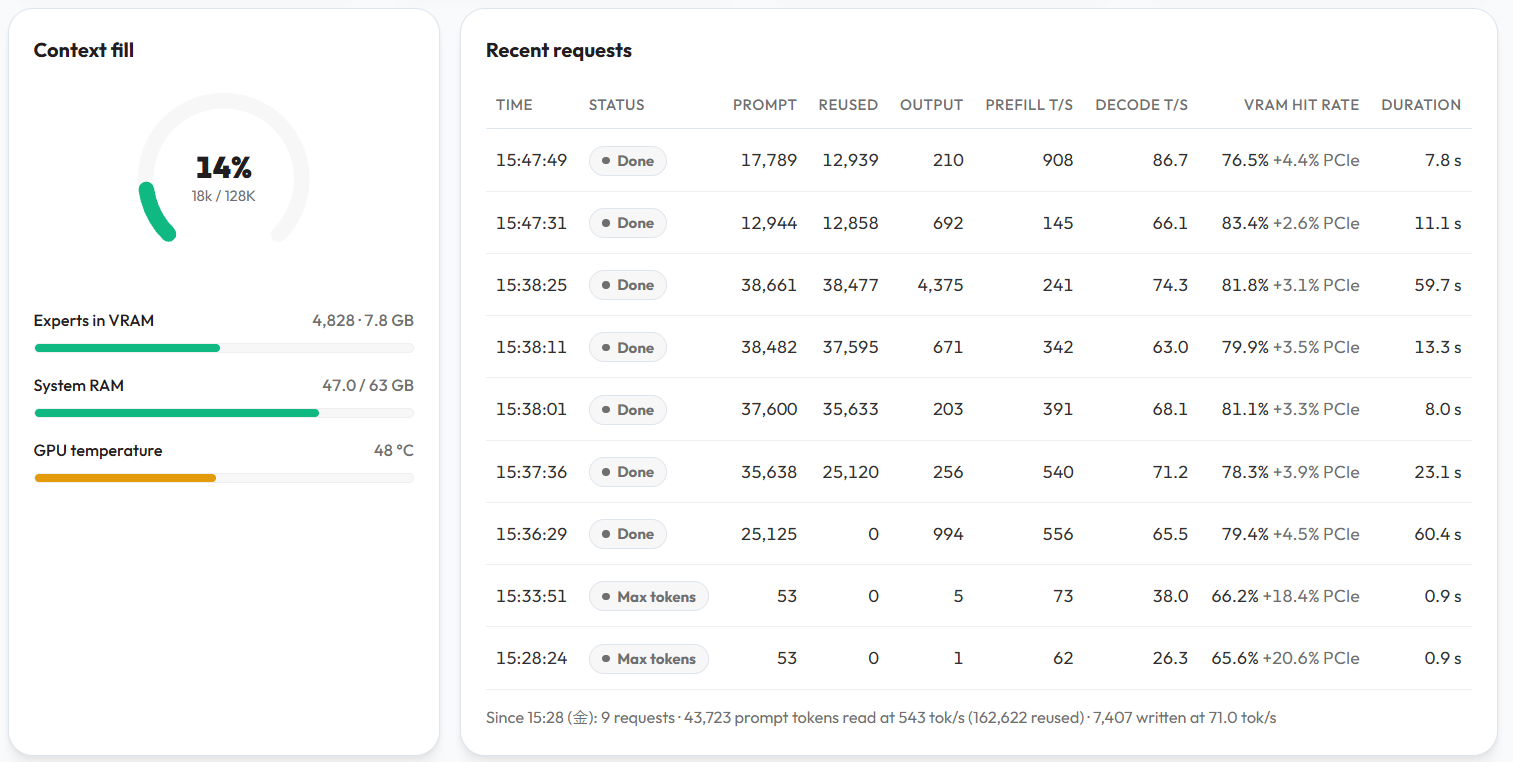 Figure 9: The bottom half of the monitor screen
Note that if you have the API enabled, these features require you to properly set an API key.
 (Screen 1)
Looking at the upper right of the screen, you’ll see it says “API key needed.”
In that case, scroll down a bit on the About screen, where you’ll find a field for entering the API key — set it there.
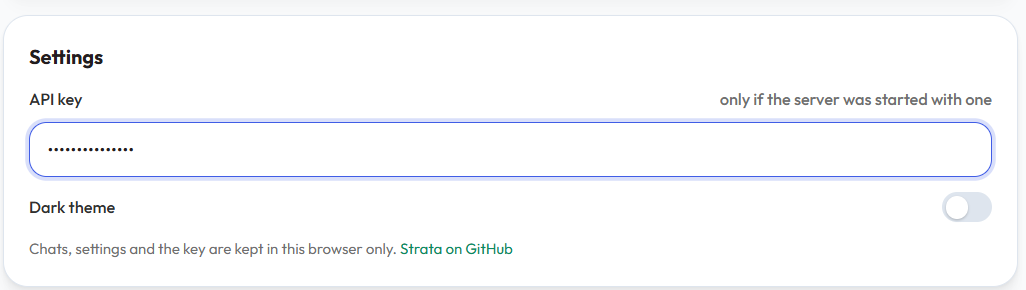 (Screen 2)
Once the display in the upper right changes to idle, authentication succeeded.
What’s It Actually Like to Use?
How Much Resource Does It Consume?
Comparing resource consumption across each tier gave the following results.
| Tier | Usage | Impression |
|---|---|---|
| GPU VRAM | 15,639 MiB | Nearly full |
| Main memory (Shard 1) | 41.0 GiB | About as expected |
| SSD (Shard 2) | 81.0 GiB | About as expected |
Table 5: Summary of resource consumption. Because a 3-bit quantization was used, the footprint stayed relatively small.
That left roughly 23,000 MiB of free memory and about 17 GiB of free storage, so running any additional tools on top of this might be a bit of a stretch. That said, if you’re running this as a dedicated appliance, I don’t think that constraint matters all that much.
For example, I think a setup like the one below would work well for using this inference environment across a workgroup or within an organization.
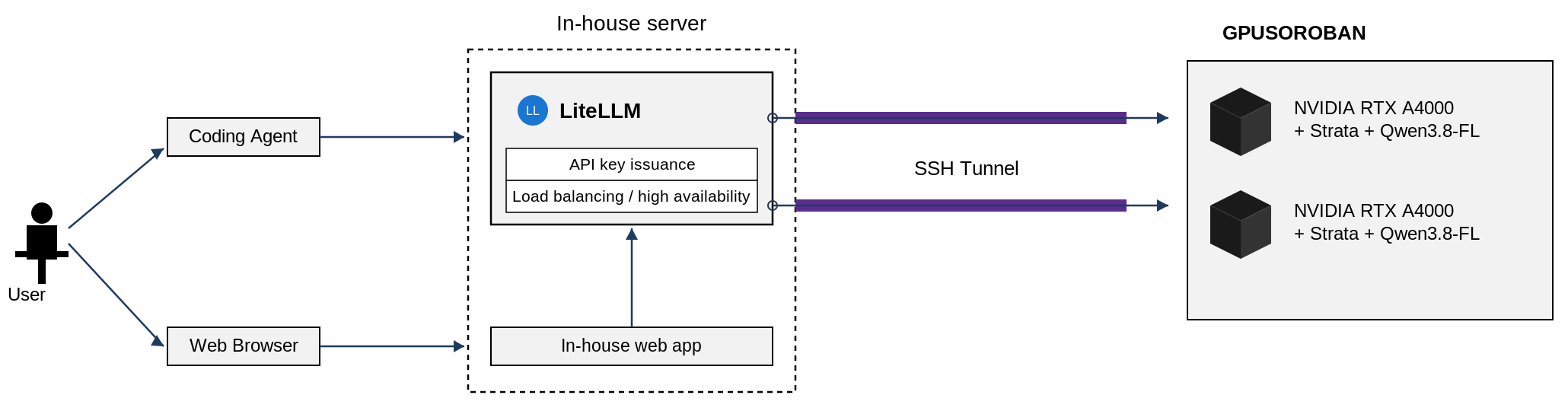 Figure 10: A configuration envisioned for enterprise use
How Good Is the Performance?
Here are the actual results from interacting with the model through a Dify Agent.
| Time | Prompt | Reused | Output | Prefill t/s | Decode t/s | VRAM hit rate | Duration |
|---|---|---|---|---|---|---|---|
| 16:18:22 | 50,582 | 46,650 | 6,760 | 719 | 68.3 | 84.10% | 104.4 |
| 16:17:41 | 46,655 | 38,349 | 1,290 | 665 | 65.6 | 84.40% | 32.2 |
| 16:17:04 | 38,354 | 14,694 | 966 | 1,548 | 69.7 | 83.30% | 29.1 |
| 16:16:48 | 14,699 | 13,661 | 343 | 485 | 77.5 | 80.40% | 6.6 |
| 16:16:40 | 13,666 | 13,024 | 240 | 443 | 75.1 | 79.20% | 4.7 |
| 16:16:30 | 13,029 | 12,858 | 483 | 225 | 69.5 | 84.30% | 7.7 |
| 15:55:15 | 27,256 | 12,858 | 6,028 | 1,529 | 78 | 81.50% | 86.7 |
| 15:51:38 | 84,787 | 76,691 | 7,070 | 421 | 73 | 82.30% | 116.1 |
| 15:50:39 | 76,696 | 58,114 | 2,137 | 752 | 67 | 82.00% | 56.6 |
| 15:50:15 | 58,119 | 50,647 | 637 | 621 | 69.5 | 79.90% | 21.2 |
| 15:49:54 | 50,652 | 44,921 | 744 | 896 | 70.9 | 80.60% | 16.9 |
| 15:49:20 | 44,926 | 18,646 | 507 | 1,409 | 69.8 | 80.20% | 25.9 |
| 15:49:03 | 18,651 | 12,939 | 301 | 1,268 | 76.9 | 75.30% | 8.4 |
| 15:48:32 | 12,944 | 12,858 | 1,803 | 178 | 69.3 | 87.50% | 26.5 |
| 15:47:49 | 17,789 | 12,939 | 210 | 908 | 86.7 | 76.50% | 7.8 |
| 15:47:31 | 12,944 | 12,858 | 692 | 145 | 66.1 | 83.40% | 11.1 |
| 15:38:25 | 38,661 | 38,477 | 4,375 | 241 | 74.3 | 81.80% | 59.7 |
| 15:38:11 | 38,482 | 37,595 | 671 | 342 | 63 | 79.90% | 13.3 |
| 15:38:01 | 37,600 | 35,633 | 203 | 391 | 68.1 | 81.10% | 8 |
| 15:37:36 | 35,638 | 25,120 | 256 | 540 | 71.2 | 78.30% | 23.1 |
| 15:36:29 | 25,125 | 0 | 994 | 556 | 65.5 | 79.40% | 60.4 |
| Average | 36,060 | 28,073 | 1,748 | 680 | 71.19 | 81.21% | 34.59 |
Table 6: Performance measurements from running Qwen3.8-Flash-Next on Strata
Honestly, the prefill speed isn’t all that fast. Prefill performance heavily reflects the raw speed of the GPU processor itself, and here the NVIDIA RTX A4000’s relative weakness shows through. The KV cache also isn’t held entirely in VRAM — not even at the 128k I configured here, let alone the model’s maximum of 256k. Only a fixed amount is kept in VRAM, with whatever doesn’t fit spilling into pinned main memory by design, which may have introduced some overhead there. That said, Strata’s prompt cache absorbs most of that, so the perceived speed doesn’t come across as especially slow.
What’s really surprising is just how high the hit rate is on the VRAM Expert cache. This ties into both the Expert and KV caches, and it’s precisely because that hit rate is so high that actual throughput comes out as high as it does, I’d guess.
As for the output speed itself — when I evaluated Qwen3.8-Flash-Next on an A100 instance a while back, llama.cpp’s output speed came out to roughly 50–60 tok/s, so seeing numbers beat that here was genuinely surprising.
Conclusion: Remember, This Is a Specialized Inference Engine
That said, because this setup — built around Qwen3.8-Flash-Next — is a specialized inference engine, trying to use it for inference with other models runs into some real strain.
It only pays off when MoE and n-gram Embedding work together. This engine achieves its performance through a very finely structured, large-scale set of Experts, combined with shifting the n-gram Embedding — which would normally sit in main memory — onto the SSD via PLE. That means running something like a Dense model on it would be a real stretch. Move the Dense layer into main memory and output speed collapses into single-digit tok/s, dragged down by that throughput; move it into VRAM instead and you defeat the whole point.
On top of that, Qwen3.8-Flash-Next is a model that uses N-gram Embedding to fill in the knowledge gap that would otherwise remain if it were built purely out of MoE. It’s not an exaggeration to say the whole scheme only works because that gets shifted onto the SSD via PLE. It might be implementable with a standard MoE architecture too, but MoE itself tends to lag behind Dense models on answer quality, so it hasn’t been widely adopted elsewhere — and applying Strata to other MoE models honestly feels like it would be more complexity than it’s worth.
It still leans heavily toward individual use. The design assumes a prompt cache is in play, so disabling it is likely to hurt prefill performance. It’s also still early in development and, if anything, feels reminiscent of older versions of llama.cpp. My honest impression is that it’s still got a fair number of rough edges before it’s ready for concentrated enterprise use.
That said, settings to turn Prompt Cache off and to configure Parallel have since been added, tying in with some of llama.cpp’s own features to make it hold up better for enterprise use — and wasted processing is steadily being trimmed away, making it run noticeably faster.
This isn’t limited to what I’ve covered here — it’ll all depend on the details of whatever models come next — but if Strata ever manages to absorb models other than Qwen3.8-Flash-Next into main memory this cleanly, it would overturn a lot of assumptions we currently take for granted. In that sense, I’m looking forward to seeing where this goes.
Personally, I get the sense this product was built with exactly that kind of foresight in mind, and I’m excited to see what comes next.
Notes
- By the time this article is published, Qwen4.0 may already be out — but even accounting for that, Qwen3.8-Flash-Next remains a remarkably capable model. ↩︎
- Development is moving very fast, so the actual version may well be further ahead by the time you read this. Thanks for your understanding. ↩︎
- The advertised spec said 50GB, but the
topcommand showed 64,044.5 MiB. My guess is the advertised figure was actually showing remaining memory. ↩︎
References
Deepwiki, Niko1221/Strata https://deepwiki.com/Niko1221/Strata
Niko1221. “Strata README.md (Version 0.2.2 / engine 0.1.47).” GitHub main branch. https://github.com/Niko1221/Strata/blob/main/README.md
Niko1221/Strata. “strata_cli/launch/settings.py (LaunchSettings, SCHEMA, ACCESS_KINDS, split_setting, as_argv_changes, flags_text, slug).” GitHub main branch. https://github.com/Niko1221/Strata/blob/main/strata_cli/launch/settings.py
Appendix: strata launch Help (English reference)
Usage (as in the original)
usage: strata launch [-h] [--preset NAME] [--model NAME] [--family NAME]
[--model-path PATH] [--data-dir DIR] [--move-data]
[--context SIZE] [--kv FORMAT] [--vision off|on|gpu|cpu]
[--parallel N] [--mtp on|off] [--gpu LIST]
[--gpu-roles LIST] [--tune quick|thorough|skip] [--tune-allow-small]
[--set KEY=VALUE] [--pool-cores LIST]
[--access local|lan|cloudflare|tailscale] [--port N] [--api-key KEY]
[--api-key-env NAME] [--new-key] [--no-api-key]
[--save-preset NAME] [--retune] [--no-tui] [--open] [--yes] [--plan]
[--feed URL|DIR] [--output {human,json}][--list-presets]
[--delete-preset NAME] [--status] [--stop]
[--show-key]
Overview
Brings model setup, tuning, starting the serve, and monitoring together in one place.
Run it without any flags and a guided screen opens. You can choose to start from a saved preset or set up from scratch. Each screen asks you to decide just one thing.
Add flags and it does the same thing without asking questions, then opens the monitor. Add --no-tui and it prints the address and exits instead.
Presets are shared with the Strata app’s profiles and tuning presets.
Common
| Option | Argument | Meaning | Source label |
|---|---|---|---|
| -h, –help | none | Show this usage and exit | options |
Table 7: Common options
What to Run
| Option | Argument | Meaning | Default / notes |
|---|---|---|---|
| –preset NAME | name | Start from a saved preset. Combine with other flags to change just this run | No default |
| –model NAME | name | Model size. E.g. iq3_xxs, q2_0, ud-q4_k_xl. Case-insensitive | — |
| –family NAME | name | Specify the family when the same size is offered under multiple model families (qwen, swift, coder, etc.) | — |
| –model-path PATH | path | Use a model file you already have — a folder containing shards, or a single .gguf file | — |
| –data-dir DIR | directory | Where to store downloaded model files | Strata’s data folder |
| –move-data | none | Used together with –data-dir to move a model you already have into the new folder. Without this flag nothing is moved — existing models stay usable where they are, and the new folder becomes the destination for future downloads | Not moved |
| –context SIZE | size | Amount of text that can be remembered at once: 32k, 64k, 128k, 256k, or a token count | — |
| –kv FORMAT | format | Conversation memory (KV cache) format: int8, q4_0 (half the memory), k8v4, fp16 | Default int8 |
| –vision off|on|gpu|cpu | 4 choices | Let the model read images. “on” picks the reader based on video memory (CPU reader under 24GB, GPU reader at 24GB+, regardless of vendor). gpu/cpu select explicitly; off disables image support | Default: on, if the model can read images and the engine has an image reader |
| –parallel N | 1–8 | Number of requests served simultaneously | Default: value matched to the graphics card |
| –mtp on|off | on/off | Draft layer that speeds up responses. off starts without it, saving about 1GB of video memory and some RAM, but responses are slower. Useful when the engine fails to start on smaller cards or machines with less RAM | Default on |
| –gpu LIST | numbers | Which graphics cards to use, e.g. 0, 0,1 | Default: engine’s choice |
| –gpu-roles LIST | role list | Assign a role to each card: main, helper, off. E.g. 1=main,0=helper. Unspecified cards are off. main runs the final step of each response; helper holds part of the model | — |
| –tune quick|thorough|skip | 3 choices | Search for the fastest settings first | Default here: skip. The guided screen suggests quick on first run |
| –tune-allow-small | none | Let the tuner also try settings that may change answers very slightly | Default: not tried |
| –set KEY=VALUE | KEY=VALUE | Set one advanced engine setting or STRATA_* variable, e.g. prefill=65536. Can be repeated. Unknown names only produce a warning, not a rejection | — |
| –pool-cores LIST (experimental) | list | Pin CPU workers to specific logical processors, e.g. 2,4,6,8 or 2-14:2 (numbers as shown by Task Manager or lscpu) | Default: one worker per physical core (shown in the engine’s startup line). Two entries on the same core are kept, with a warning |
Table 8: Arguments needed for basic configuration
Who Can Use It
| Option | Argument | Meaning | Default / notes |
|---|---|---|---|
| –access local|lan|cloudflare|tailscale | 4 choices | local: this computer only. lan: your own network. cloudflare: a quick tunnel. tailscale: your own tailnet | — |
| –port N | number | Port number | Default 8080 |
| –api-key KEY | key | Key clients must send. Auto-generated if shared outside this computer | — |
| –api-key-env NAME | env var name | Read the key from this environment variable | — |
| –new-key | none | Create a new API key | — |
| –no-api-key | none | Share outside this computer without an API key. A warning is shown, but it isn’t refused | — |
Table 9: Access-related settings
Running / Saving
| Option | Argument | Meaning | Default / notes |
|---|---|---|---|
| –save-preset NAME | name | Save this selection under this name | — |
| –retune | none | Combine with –tune (uses quick if –tune isn’t given) to re-measure even on a computer that’s already been tuned | Default: reuse the saved tuning result and skip measurement |
| –no-tui | none | Don’t open the screen — serve, print the address, and exit | — |
| –open | none | Open the server’s web page in a browser when serving starts. Without this flag, no browser is opened | Default: don’t open |
| –yes | none | Don’t ask questions — e.g., whether to download a model on a computer without the engine installed | Default: ask |
| –plan | none | Show what would happen and exit. Nothing is changed | — |
| –feed URL|DIR | URL or directory | Location of the signed update feed (where the engine is downloaded from) | Default: STRATA_UPDATE_FEED, or the project’s default (the original text cuts off its own explanation here) |
| –output {human,json} | human / json | Output format. Not documented in the source | Not documented in the source |
Table 10: Options related to execution and saving settings
Manage
| Option | Argument | Meaning |
|---|---|---|
| –list-presets | none | List saved presets |
| –delete-preset NAME | name | Delete a saved preset |
| –status | none | Show what this command is currently serving |
| –stop | none | Stop what this command started. Combine with –preset NAME to stop just that one preset |
| –show-key | none | Show the API key for –preset NAME (or the currently running launch) |
Table 11: Management options
Examples (commands kept as in the original)
Open the guided screen
(From the list of saved presets, or set up from scratch.)
strata launchStart a saved preset and open the monitor.
strata launch --preset "IQ3_XXS 128K"Specify everything on the command line, serve, and print the address.
strata launch --model iq3_xxs --context 128k --parallel 4 --vision off --tune quick \
--access lan --port 8080 --save-preset "Office" --no-tui
Use a model file you already have (a folder, or a single .gguf).
strata launch --model-path /data/models/IQ3_XXS --no-tuiChange just one advanced setting for this particular launch.
strata launch --preset Office --set prefill=65536 --set STRATA_PIN_BY_NEED=1 --no-tuiChange nothing — just show what would happen.
strata launch --plan --model q2_0Manage presets and running state.
strata launch --list-presets | --delete-preset NAME | --status | --stop [--preset NAME]List the apps Strata can connect to (the connect subcommand, not launch).
strata connectWrite OpenCode configuration for the running server (a backup is kept).
strata connect opencode --writeAppendix: List of Selectable Models
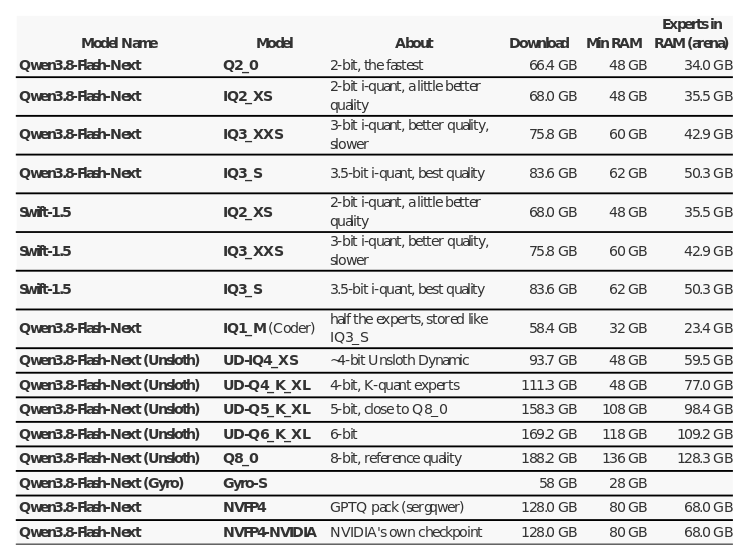 Table 12: Models selectable in the installer and the resources they require