
Open-weight models now rival the big commercial ones, and AI agents call them many times per task, which makes “rent an API or rent the GPUs?” a question worth asking again.
If you’re building a product on generative AI, the obvious move is to call an LLM API from OpenAI, Anthropic, Google, or another provider. You get a frontier-class model on day one, with no GPUs to source and no inference servers (the machines that actually run the model) to set up. In 2026, that is still a perfectly sensible default.
But two big shifts are reshaping the generative AI landscape in 2026, and together they change the picture.
The first is the spread of AI agents. An agent is a system in which a language model doesn’t just answer a question. It plans, calls tools such as search or code execution, checks the results, and keeps going until the job is done. OpenAI ships an Agents SDK for exactly this [1], and workloads where a single task triggers many model calls are now routine rather than exotic.
The second is how quickly open-weight models have improved.
An open-weight model is one whose trained parameters (its “weights”) are published, so you can download it and run it on your own GPUs. A striking 2026 example is Kimi K3: a 2.8-trillion-parameter model released with its full weights [2]. Models in the top tier of capability can now be deployed and run on infrastructure you control.
Put those together: we are using LLMs far more intensively, and at the same time the option to run a top-tier model yourself, rather than through someone else’s API, is becoming much more realistic.
That brings back a question many teams thought was settled: do you pay for an LLM API, or do you secure GPU compute and run the model yourself?
This article walks through the differences between an LLM API and the “cloud GPU plus open-weight model” route, and what running your own LLM on rented GPUs actually buys you in 2026.
TL;DR: What do you actually get by running an LLM on cloud GPUs?
- 💰 Cost: you stop paying per token and start paying for compute.
- 🔧 Technology: you decide not only which model to use, but how it runs.
- 🔐 Risk: it isn’t “safer than an API,” but far more of the stack is under your control.
- 🚀 Scope: the GPUs don’t have to be reserved for LLMs.
1. In the agent era, one question is rarely one model call
A traditional chat application is about as simple as it gets:
Add retrieval-augmented generation (RAG), where the system first searches external data such as your own documents and then hands the relevant passages to the model so it can answer from them, and a few steps appear before and after the model call:
With an agent, the shape changes again:
Notice the loop. Whether the task is finished decides whether the agent goes around again, and it can go around many times. A “tool” here might be a web search, a database query, or a snippet of code the agent runs to check its own work. Every lap is another model call, and every model call means more text going in and coming out.
This loop isn’t a quirk of one diagram. It’s the basic mechanism built into OpenAI’s Agents SDK: run a tool, inspect the result, and call the model again if needed, until the work is done [1].
Those extra laps show up on the bill. HAL, an agent evaluation platform at Princeton University, used the SWE-Agent framework on SWE-bench Verified Mini, a benchmark in which the agent has to fix real GitHub issues, the kind of bug reports and feature requests developers file against actual software projects. The recorded API cost was $162.93 with GPT-5 Medium (August 2025) and $1,599.90 with Claude Opus 4.1 High (August 2025) [3].
So in the agent era, “what does one call to this model cost?” is only half the question. The other half is “how much model work does it take to finish one job?”
For any system built around agents, that means thinking not just about
the price of a single call to a given model,
but also about
how many times the model and its tools run before a single task is complete.
This is one of the main reasons the question of where and how your LLM runs matters more than it used to.
Key takeaway
In the agent era, the number that matters is not “cost per call” but “how many model calls it takes to finish one task.”
2. 💰 APIs and cloud GPUs bill you for different things
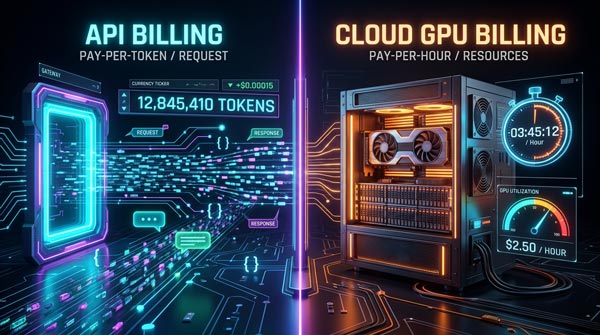
An LLM API typically charges by usage: the number of tokens you send in and the number of tokens the model sends back.
A token is the unit an LLM uses when it processes text. Take a sentence like “It’s a nice day today.” Roughly speaking, the model splits it into pieces, something like “It’s”, “a”, “nice”, “day”, “today”, and counts each one. The exact split and the token count differ from model to model, but the principle holds: more tokens in or out means a bigger API bill.
Providers have also introduced prompt caching, which reuses parts of a prompt the model has already processed, to cut cost and waiting time when the same instructions or the same long document are sent again and again.
Anthropic, for example, explains that reusing a previously processed prompt prefix reduces both the cost and the latency of repetitive work [4].
So what are you actually paying for in each case?
The big difference is the unit of billing.
With an API, the bill grows with your token usage, mainly input and output. With cloud GPUs, the bill is usually set by the compute you reserve: which GPU type, how many of them, and for how long. (Strictly speaking, the billing unit varies by provider and plan: hourly rates, monthly commitments, GPU count multiplied by running time, and so on.)
Looking only at that difference, it’s tempting to conclude:
With cloud GPUs, I can stop worrying about tokens.
But “no per-token metering” and “tokens don’t matter” are two different things.
Feed the model a very long context (the material it’s given to work with, such as a lengthy document or a long conversation history), or have it generate huge amounts of text, and the computation and memory it consumes on the GPU go up accordingly. And if you reserve GPUs but don’t keep them busy, you still pay for every hour they’re running. Think of a rented office: the rent is due whether or not anyone is sitting at the desks.
That’s why “APIs are expensive and cloud GPUs are cheap” doesn’t hold as a blanket statement.
What matters is that the two cost structures are different.
An API charges you mainly for how much you use the model. Cloud GPUs charge you for which compute resources you use, and for how long.
The more your workloads look like agents and RAG, with many model calls and processing steps inside a single task, the more important it becomes to ask not “what’s the per-token price?” but which cost structure fits this workload.
Key takeaway
APIs bill by usage; cloud GPUs bill by compute. Which cost structure comes out ahead depends on the workload.
3. 🔧 What cloud GPUs really expand is your freedom to shape the AI stack
If you judge cloud GPUs by cost alone, you’ll miss their most distinctive feature.
That feature is choice: the model and the inference environment that an API provider decides for you become things you select and configure yourself. (The inference environment is the software layer that loads a model onto the GPUs and serves requests to it.)
The two approaches draw the line in different places between what you build and manage and what the provider handles.
| Aspect | LLM API | Cloud GPU + open-weight model |
| Model | Use the models the API provider offers | Choose and deploy an open-weight model yourself |
| Inference environment | Built and operated by the API provider | Choose and set up your own, such as vLLM |
| Model compression | Depends on the provider’s setup | Choose your own quantization: FP8 / INT8 / INT4 |
| RAG / agents | Build in-house on top of the API | Build on the model and inference stack you deployed |
| Training / fine-tuning | Within whatever features the provider offers | Run LoRA / QLoRA / fine-tuning yourself |
| GPUs | Managed by the API provider | Reserve what you need from a cloud provider |
One thing to be clear about: RAG and agents do not require cloud GPUs. You can build both on top of an LLM API.
The difference is whether you also get to choose and tune the model and the inference environment underneath them.
Running an open-weight model on cloud GPUs lets you design the setup to your own requirements. For example, you can:
- Quantize the model to shrink its GPU memory footprint
- Pick the inference engine (vLLM is one option)
- Swap the embedding and reranker models used in RAG to suit the task
- Have an agent route different jobs to different models
- Fine-tune a model with LoRA or QLoRA (lightweight ways of training a model further on your own data) when you need to
This flexibility is about more than “advanced customization.” The more heavily and continuously you use AI, the more room it gives you to optimize cost and performance for your specific use cases.
LinkedIn is a good illustration. The company initially built its generative AI applications mainly around LLMs from Azure OpenAI. As its use cases grew, it also adopted a setup where open-source models are fine-tuned and served on LinkedIn’s own AI platform.
For certain LinkedIn-specific tasks, the company reports, a fine-tuned Llama matched or beat commercial foundation models (the large, general-purpose models sold by the big AI labs) on quality while delivering lower cost and latency [5].
So the point of cloud GPUs is not simply “renting a server to put an LLM on.”
It’s this: you secure the compute you need without owning the hardware, and then design and optimize the model and the inference environment on top of it for your own use cases and scale.
That is the real distinction between cloud GPUs and an API.
Key takeaway
With cloud GPUs, you don’t just use a model. You design how it runs.
4. 🔐 What about sensitive data? Not “safer than an API,” but a different scope of control

Security and privacy are often cited as reasons to run an open-weight model yourself.
But it would be inaccurate to assume that cloud GPUs are simply “safer than an LLM API.”
With cloud GPUs, your data is still stored and processed on a cloud provider’s infrastructure. You still have to manage risk across access control, encryption, networking, contract terms, and more.
What’s different is that instead of sending data to an external LLM service, you build the model and data platform yourself inside the cloud environment you’ve contracted, and you can design logging, outbound network traffic, and the rest to your own requirements.
At the same time, LLM APIs have made real progress on sensitive data. OpenAI’s API doesn’t use your inputs and outputs for model training, and organizations that meet certain conditions can get Zero Data Retention (ZDR) [6]. Anthropic also offers ZDR for the Claude API [7].
The real question, then, is not “which is safer, API or cloud GPU?” but “how much of our data and AI infrastructure do we need to control ourselves?”
Real-world examples point in both directions. eSentire needed to keep its customers’ confidential data away from outside LLM providers, so it fine-tuned Llama on AWS and built its own training and inference environment [8]. Palo Alto Networks, on the other hand, handles highly sensitive source code with Claude on Amazon Bedrock, combined with a private VPC endpoint, a private network path that keeps the traffic off the public internet [9].
The stronger your requirements, whether that’s no sensitive data sent to an outside LLM vendor, your own rules for how models and logs are managed, or full control over outbound traffic, the more compelling cloud GPUs with open-weight models become.
On-premises infrastructure puts an even wider scope under your control, but it means buying high-end GPUs up front, running the facilities yourself, and losing the ability to scale compute up and down easily.
That makes cloud GPUs the middle option: no physical infrastructure to own, but a much wider scope of control over your data and your AI platform.
Key takeaway
Cloud GPUs still carry the usual cloud risks to manage, but they free you from depending on an external LLM service and put far more of your data and AI stack under your own rules.
5. 🔧 Quantization: making the most of limited GPU memory

With cloud GPUs, it’s not just a question of which GPUs and how many. How you use the limited memory on each one matters just as much.
An LLM runs by loading its enormous set of parameters into GPU memory.
Meta’s Llama 3.1 70B, for instance, has roughly 70 billion parameters [10]. If each one is stored as a 16-bit number (2 bytes), a back-of-the-envelope calculation says you need about 140 GB just to hold the model.
The bigger the model, the more problems that creates: it may not fit in a single GPU’s memory, and the number of requests it can handle at once shrinks.
This is where quantization comes in. It’s a technique that represents the model’s numbers with fewer bits, moving from formats like FP16 to FP8, INT8, or INT4, so the model takes up less memory. The number in each name is the bit count per value, so FP8 stores each number in half the space of FP16 and INT4 in a quarter. The trade-off is some loss of numerical precision, which is why the choice of format is a design decision rather than a free lunch.
The official vLLM documentation, for example, says that FP8 quantization roughly halves the memory needed for the model itself and, under supported conditions, improves throughput by up to 1.6x [11].
vLLM, for anyone meeting it for the first time, is an LLM inference engine: software designed to run open-weight models efficiently on GPUs.
vLLM also supports online quantization: loading a standard BF16/FP16 model and converting it to FP8 or another format on the fly, which saves you from preparing pre-quantized models or calibration data (sample inputs used to work out how best to compress the numbers) in advance [12]. This feature is documented in the current official vLLM docs.
The model’s weights aren’t the only thing using GPU memory. As it generates text, an LLM keeps its intermediate results in what’s called the KV cache, and the longer the texts and the more requests you serve, the more memory that cache consumes.
vLLM can quantize the KV cache to FP8 as well, which lets you keep more tokens in GPU memory and creates room to improve throughput and long-context handling [13].
In other words, the same GPU can host different models and handle different volumes depending on how you quantize the model and manage memory at inference time.
With cloud GPUs, you’re not just picking a fast chip. You’re designing the balance of quality, memory, and inference performance for your use case, software optimizations included.
Key takeaway
On the very same GPU, quantization and similar techniques change which models you can run and how much work they can do.
6. 🔧 Beyond shrinking the model: you can optimize how the computation is done

The previous section covered quantizing the weights and the KV cache to reduce GPU memory use.
That isn’t the only way to get more out of the same GPU.
Alongside saving memory through quantization, you can use the GPU more efficiently by avoiding redundant computation and by being smarter about how requests are processed.
That job falls to the inference engine, such as vLLM. vLLM is not an LLM itself. It’s the software that gets an LLM on a GPU to work through requests efficiently.
One of its signature features is Automatic Prefix Caching.
Imagine sending the model a different question each time, but always with the same long system prompt in front of it. (A system prompt is the standing set of instructions, such as a persona, rules, and background information, that sits at the top of every request.)
Normally, each request has to process that shared part all over again:
With Automatic Prefix Caching, the KV cache computed once for the shared part can be reused [14]
When you’re asking many questions about the same long document, or running an agent that reuses the same system prompt over and over, this means far less recomputing of identical material from scratch.
To be fair, caching isn’t something only self-hosted GPUs can do.
LLM APIs such as Anthropic’s offer prompt caching too, reusing the same prompt prefix to cut both processing time and cost [4].
What’s different when you run an open-weight model on cloud GPUs is that caching is just one piece: you can design and optimize the inference stack itself.
Take batching, which is how the engine groups requests so the GPU handles many of them at the same time. One approach reshuffles the set of requests being processed at each generation step, dropping requests that have finished and slotting in new ones, so the GPU stays busy [15]. The original vLLM paper shows that batching many requests efficiently is key to raising throughput in LLM serving [15]. (Throughput is how much work gets done per unit of time; latency, mentioned earlier, is how long a single request takes.)
Here is how the optimizations in sections 5 and 6 fit together:
| Section 5: memory optimization | Section 6: inference optimization | |
| Problem | Model weights and the KV cache crowd out GPU memory | Redundant computation and inefficient request handling |
| Typical techniques | Quantizing weights and the KV cache | Prefix caching, fine-grained batching |
| Goal | Reduce GPU memory use | Cut unnecessary work and process requests efficiently |
| Result | Easier to run larger models and handle more tokens | Room to improve latency and throughput |
None of this happens automatically just because you’re on cloud GPUs.
What cloud GPUs give you instead is the ability to design quantization, caching, and request handling around your own use cases.
In short, you decide how to get the most out of the GPU for what you’re building.
Key takeaway
GPU performance isn’t only about the hardware. Caching, request handling, and other choices about how the computation runs change it too.
7. 🚀 GPUs aren’t just for LLMs. They serve many kinds of AI work

So far the focus has been LLM inference, but GPUs you’ve reserved can do a lot more.
In RAG, for example, the LLM isn’t the only model involved. You also use an embedding model to turn documents and questions into vectors (lists of numbers that capture meaning, so that similar texts can be matched up), and a reranker to re-order the search results so the most relevant ones reach the LLM first.
And once you have GPUs, you can move beyond running an LLM into fine-tuning it on your own data, or into entirely different AI workloads such as image recognition.
Omada Health, a healthcare company, did exactly this. It fine-tuned Llama 3.1 8B with QLoRA on its own nutrition-coaching data to build an AI-driven nutrition education service, and that service also recognizes photos of meals. It’s a single product that brings LLM training, LLM inference, and image recognition together [16].
In that light, cloud GPUs are a compute resource for running multiple AI workloads at once:
| Use | Examples of work the GPUs can run |
| Generative AI | LLM / VLM (vision-language model) inference |
| RAG | Embedding / reranker models |
| LLM training | LoRA / QLoRA / full fine-tuning |
| Classic deep learning | Image recognition / speech recognition / natural language processing |
Seen this way, the question when weighing cloud GPUs is not just “is this cheaper than an LLM API?” but “how much of our overall AI work could these GPUs take on?”
Key takeaway
Having your own GPU environment opens the door to fine-tuning and other training, not just LLM inference. It also covers image recognition and other deep learning, which widens the range of AI solutions you can build.
8. Wrapping up: API, cloud GPU, or on-premises? Which should you pick?

As we’ve seen, cloud GPUs are not simply “cheaper than an API” or “safer than an API.”
An API’s great strength is that you can use a ready-made model immediately, without building GPUs or an inference platform yourself.
Cloud GPUs widen the scope you have to operate. In return, you can design and optimize the model choice, quantization, inference engine, RAG, fine-tuning, and more around your own use cases.
And if you also need to manage the physical facilities and the network yourself, on-premises (running GPU servers in your own data center) is the option.
The real decision, then, is how much of the AI system you want to hand to a provider, and from which point you want to design and manage it yourself.
Here is a rough decision guide that pulls the article together:
It helps to think of the three not as rivals but as options that differ in how much you own.
With an LLM API, you leave the model, the GPUs, and most of the inference platform to the provider.
With cloud GPUs, the GPUs themselves are the cloud provider’s compute, but you configure the model and the inference environment that run on them.
With on-premises GPUs, you own and manage the physical environment too: the GPU servers, the network, and everything around them.
If you had to sum up cloud GPUs in a sentence, it would be this:
You don’t own the GPUs. But the AI stack running on them is yours to design.
There’s no reason to force workloads onto cloud GPUs when an API serves them perfectly well. A customer-support chatbot with modest traffic, for instance, is usually well served by an API. But as your use of AI expands into RAG, agents, fine-tuning, and image recognition, and you find yourself wanting to tune the model and the inference environment for each job, the case for cloud GPUs grows much stronger.
The important thing isn’t to decide “API or GPU” at the outset. It’s to work out how much freedom and how much control your own AI workloads actually need.
References
[1] OpenAI, Running agents – OpenAI Agents SDK
[2] Hugging Face, moonshotai/Kimi-K3
[3] Princeton University, HAL: SWE-Agent – Agent Performance
[4] Anthropic, Prompt caching – Claude Platform Docs
[5] LinkedIn Engineering, Behind the platform: the journey to create the LinkedIn GenAI application tech stack
[6] OpenAI, Data controls in the OpenAI platform
[7] Anthropic, API and data retention – Claude Platform Docs
[8] AWS, eSentire delivers private and secure generative AI interactions to customers with Amazon SageMaker
[10] Hugging Face, meta-llama/Llama-3.1-70B-Instruct
[11] vLLM, FP8 W8A8
[12] vLLM, Online Quantization
[13] vLLM, Quantized KV Cache
[14] vLLM, Automatic Prefix Caching
[15] Kwon et al., Efficient Memory Management for Large Language Model Serving with PagedAttention
[16] AWS, How Omada Health scaled patient care by fine-tuning Llama models on Amazon SageMaker AI
Source: “LLM APIだけでいいのか?――高性能オープンLLMとAgent時代のクラウドGPU再入門” (Is an LLM API All You Need? A Fresh Look at Cloud GPUs in the Age of High-Performance Open LLMs and AI Agents), [URL]


Comments